 Ah, PPC reporting. It’s a necessary part of any PPC manager’s job, and yet often the most hated. Sure, creating weekly or monthly reports can be tedious, but it’s also important to both the PPC manager and their clients or bosses.
I asked members of the PPCChat community for tips on creating great reports. Here are 5 ways to ensure you’re putting together awesome PPC reports.
Focus on metrics the client cares about.
Several people mentioned this, and for good reason. As PPC managers, we sometimes tend to focus on things that are important to us, like quality score. But most clients don’t care about quality score. They care about how many leads or sales they got from PPC last month, along with other metrics like cost per acquisition and trends. “Report on metrics and wins or losses that are important to the client, not you,” says Davis Baker of Forthea Interactive. “Report only on KPIs the client cares about,” echoed Kirk Williams of ZATO.
Justin Freid of CMI Media put it another way: “Understand what drives your client’s business. Don’t just pump out clicks, impressions, CPC and conversions. Report on what is relevant and drives their business.”
So many PPC reports consist of page after page of Excel data. We PPC managers live in Excel (more on that later), but many clients don’t. Don’t force them to study tables of data to draw conclusions; tell them what happened with the metrics that are important to them.
What if your client wants to measure KPIs beyond what’s available in Adwords or Bing Ads? Content marketing is a particular challenge: how do you measure which content performed best? Steve Plimmer of ESV Digital recommends using custom parameters in URLs to report on useful segments. You can do this via the new AdWords Upgraded URLs, or by adding content IDs to your utm_content parameters in Google Analytics.
Make the data digestible.
“Include insights and a story. The client doesn’t REALLY care about the numbers, they want us to tell them what the numbers MEAN,” says Ben Nusekabel of gyro. Kirk Williams echoed this sentiment, and I have to agree.
Rarely does a client tell me they want more numbers and charts. But I get a lot of questions on what the data means. Try to write a simple story to go with every report. Here’s a format you could follow:
- What happened with their key metrics?
- Why did this happen and what does it mean to their business?
- What steps are you taking to maintain or improve performance based on this info?
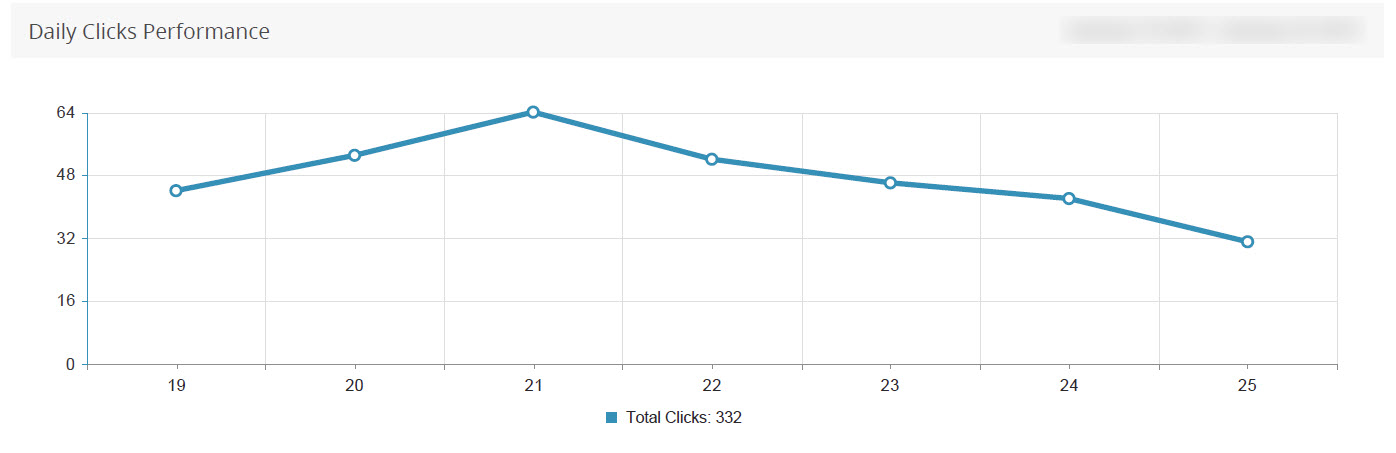
Consider this graph. How digestible is this to you?
How about this one?
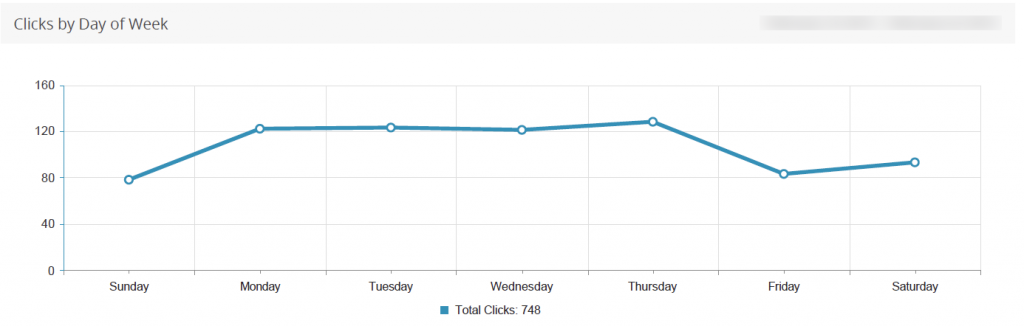
In the first graph, it’s impossible to gauge traffic trends without looking at a calendar. In the second, you can tell in an instant that Friday was the lowest traffic day of the week, and you can start to draw inferences about what that means to your business quickly. Making data digestible means not making your client think too hard about what you’re trying to say.
Include Trends and Context
The graphs above show trends. But to make the data really meaningful, you need to explain the context. Did you cut your budget on Thursday, resulting in lower spend Friday? Or did you pause an ad group that was driving a lot of clicks? “When reporting a metric, always do 3 things – segment, trend and benchmark. This leads to the most insights,” says Michael Fleming of Pole Position Marketing. James Svoboda of Web Ranking echoes the sentiment: “Report on conversions and engagement metrics that you can detail over time to show trends and patterns and keep a historical record of.”
Data in a vacuum is meaningless. Compare stats to last week, last month, or even last year to add context to the data in your reports.
Automate As Much As Possible
“Automate everything except for the insights. Data shouldn’t be pulled by a human, but personal touch on analysis/insights is crucial,” says Aaron Levy of EliteSEM.
You don’t have to automate PPC reporting, but it makes things a lot easier. You’ll have more time and brain space for insightful analysis if you don’t have to spend hours manually pulling data.
To automate reports, you can use a paid tool (more on that in a minute), or you can use Adwords Scripts. John Ellis of Crescent Interactive wrote a great post on using Adwords Scripts for reporting.
Tools For Success
The number one tool for PPC reporting, without a doubt, is Excel. “Excel, Excel, and Excel,” says Andrew Bethel of Fibre Glast Developments. Excel was also mentioned by Matt Vaillancourt of SNHU and Steve Plimmer.
Several experts also suggested Swydo, including Kirk Williams, Andrew McGarry of McGarry Fashion, and Davd Konigsburg of Optimal Targeting. Swydo is a PPC reporting, monitoring, and workflow tool.
Zach Etten of Vertical Measures and Luke Alley of Avalaunch Media both like NinjaCatPPC, reporting software for agencies.
I personally love Acquisio for reporting. Part of their bid management software includes a robust reporting interface.
“Bing Ads Intelligence can be used in very cool ways to expand accounts and monitor demographic and geographic variances on current accounts,” said Steve Plimmer. Bing Ads Intelligence is free, and connects to your Bing Ads accounts, so it’s a valuable reporting tool as well.
Whew! Huge thanks to all of the PPC professionals who provided reporting suggestions! You now have no excuse for creating bad PPC reports. What are your favorite PPC reporting tools?

Melissa Mackey
Latest posts by Melissa Mackey (see all)
- Getting Started with Audience Targeting in PPC - January 21, 2016
- 5 Killer PPC Landing Page Ideas For Competitor Keywords - September 9, 2015
- Why SMB Retailers Don’t Do Search - July 16, 2015
- Can Facebook Unseat Google? - May 27, 2015
- Using Google Analytics To Track PPC Content Performance - April 21, 2015
MamboMan says
same graph/image used for both examples
Jennifer Slegg says
Fixed 🙂
Bastien says
Excellent advices. Each business could have different metrics to monitor. Analysis from the campaign managers is the most important thing in a PPC report. Data without analysis are worthless.