 This year one thing everyone seems to be talking about is crawl budget. But what is it, why is it so important and how can you optimise it for search engines?
What is a Crawl Budget?
Put simply, crawl budget is an imaginary amount of pages that Googlebot will spend attempting to crawl and index your website.
If you have a website with over 1,000 URLs and a mere handful of 100 backlinks, chances are that Googlebot will not crawl your entire website on a regular basis.
Sure, you can submit your Sitemap and perform a Fetch As Google in your Google Webmaster Tools, but if your website is too big for its backlink profile, it’s not going to get crawled as thoroughly or as regularly as you would like.
It costs Google money to crawl the web and index it. So why would they waste time, money and resources struggling to crawl the entire (and rapidly growing) internet? It’s far better for them to skim the top of your website, pick up the good stuff and move on to the next one.
This could also be considered to be an important requirement for the Google “Quality” Update which was rolled out on the 3rd of May.
Site Structure
This means that your site structure is more important than ever before. Many years ago, when I was a young SEO, I remember Moz’s Rand Fishkin imparting the advice to make sure that “users are never more than 3 clicks away from your home page.”
It’s great advice for SEOs trying to get websites crawled. It’s also brilliant advice for usability. Because your users are unlikely to dig very deeply into a website.
Google has often appeared to copy user behaviour, whether it’s scanning Meta titles for keywords from left to right or only regularly visiting the top tier pages on a website. So we should always consider the user experience when we are optimising websites for the search engines. Scary as it sounds, they may one day be one and the same.
So if you haven’t got a clean, user friendly, search engine friendly navigation, now is the time to start restructuring your website.
Measuring Crawl Budget
Some big, ancient websites are a maze of interlinking deep pages, content hubs, news sections, blog sections and broken pages.
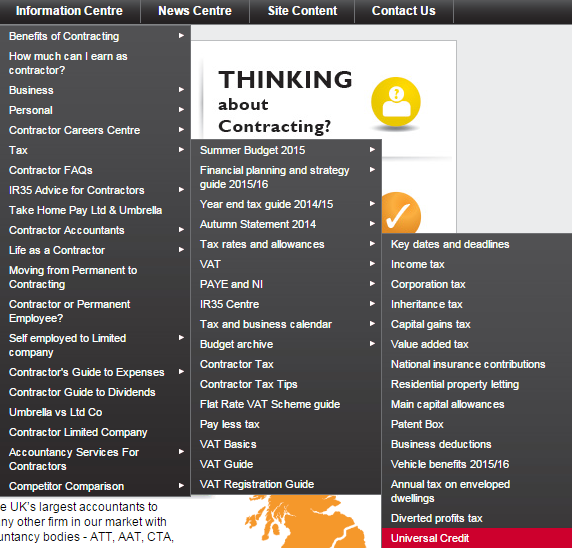
To demonstrate, here is a screenshot from the website accountancy firm which has an insane number of services and information pages. This is just one fully expanded drop down from their 9 top navigation paths.
But, because the website is so big, so old and has so many hundreds of thousands of backlinks, it has more routes into it than its competitors, which ensures that the vast majority of its pages are crawled frequently.
So we can hypothesize that a website’s crawl budget is roughly proportional to its number of backlinks, divided by its number of pages. But like anything SEO related, this isn’t an exact science when we don’t have access to all of Google’s information.
Now all we need to do is make the most of the theoretical crawl budget that our websites do have.
Robots.txt is Your Best Friend
Disallow: /*?*
Disallow: /*?
These two lines of robots.txt have stopped me from losing my mind while auditing client websites. This is because they block any URLs with a ? in. These sorts of URLs include filtered results page on ecommerce websites, internal search results pages and all sorts of garbage you don’t want search engines to crawl.
If you use Screaming Frog to help you audit your clients’ websites, you can go to the Configuration tab and Exclude these types of pages from the Screaming Frog crawl by adding /*?* and /*?
This should help to prevent Screaming Frog from crashing from data overload until you can ask a developer to update the website’s robots.txt.
No Follow
I can’t remember where I read it, but someone advised that you should No Follow your internal links to pages you do not want to be crawled, in addition to disallowing them in your robots.txt file.
The idea is that in addition to blocking these URLs from search engines, you are also telling Google not to credit the end page with an inbound link. Although it does not tell Google not to use the link itself.
But in theory, this could have a substantially positive impact on an ecommerce website that has high volumes of links to filtered results pages.
Cull Your Content
You should be in the practice of culling poor performing content for Google Panda anyway, but if you’re not, now is the time to do it for the sake of conserving your crawl budget.
After all, if users aren’t visiting these pages and they don’t rank in the SERPs, why would you want Googlebot to crawl them?
301 Redirect these pages to your home page or one tier up the site structure if they have backlinks. You can check this in Majestic SEO by clicking on the Pages tab. If they don’t, then simply remove them and all internal links to them.
Remember that crawlers have to follow 301 redirects. So make sure all of your internal linking is in order. For the sake of your server loading speed you don’t want to have thousands of 301 redirects in your htaccess file if you can help it either.
This is especially important if you find yourself culling years’ worth of blog posts.
CONCLUSION
These days, having a lean, fast loading website appears to be far more effective than a massive website with countless pages all trying to rank for a plethora of long tail search terms.
The only thing you will need to check before you start blocking filtered results pages from the robots.txt is whether or not these pages actually received any search engine traffic.
One of my clients has a big old site with a huge volume of backlinks. As a result, their crawl budget would appear to be fairly large. However, this also means that their filtered results pages seem to catch a lot of long tail search engine traffic.
So I’m presented with the dilemma of leaving their website to do its best by spreading its crawl budget very thinly, or disallowing the filtered results pages and hoping that the crawl budget is better used on their top level categories.
I’ve decided to let their site carry on doing its thing for the time being. But these are serious considerations you may face.
It’s very easy to follow someone else’s advice without paying it much though. But make sure that you check the performance of your pages before culling content and disallowing filtered results pages in your robots.txt. It may be the ‘in thing’ for SEOs to be doing right now, but it could do more harm than good depending upon your client.
Best of luck and try to spend your crawl budget wisely!


Adam Smith
Latest posts by Adam Smith (see all)
- Best Practices for Optimizing Your Crawl Budget for SEO - July 29, 2015
Ashley McNamara says
I am facing the same issue as your client above re: filtered results and longtail traffic. You mentioned potentially blocking them (opposed to meta robots no index). In general, would you prioritize preserving crawl budget over cleaning up Google’s index? I’m struggling with this decision because it’s taking us sooo long to get tons of legacy pages removed.
Adam Smith says
Hi Ashley,
I don’t see why you couldn’t do both. Either way you’re making the decision for these filtered results pages not to be indexed or ranked any more.
Since this post was written, we delved into more detail in our clients filtered results pages data and discovered that most of the traffic was coming from 8 pages. So we chose to disallow all filtered results, but allow the 8 pages that had generating long trail traffic.
Federico Sasso says
Hi Adam, nice article. I have a few observations.
The two lines
Disallow: /*?*
Disallow: /*?
are exact equivalents, as a trailing * wildcard is ignored according to Robots Exclusion Protocol.
I understand your article is about saving crawl budget in case of large sites with filtered navigation, and you are addressing the case of filtered navigation implemented by query string filters (thus the ? wildcard character in the Disallow directive), but I would first check a couple of things beforehand:
Are there legit pages using querystring parameters, which should indeed be indexed? Not all web sites use user friendly URLs throughout their whole structure.
Are there some URLs with filtering querystring parameters receiving valuable inbound links? In order not to lose link equity a proper canonicalization – without robots.txt blocking – would be a better strategy in my opinion.
About nofollowing internal links, no one is advocating PR sculpting anymore, but adding the rel=”nofollow” attribute to some links can actually help prioritizing the crawl paths. While the robots.txt Disallow directive would have the effect to prevent crawling the resource for good, a rel=”nofollow” attribute could prevent a search bot to deep dive into a site area with pages we don’t repute strategically important to be indexed/crawled/recrawled so soon and permit the spider to see the most strategic pages first. This is not something most users have to care about, but could make a difference in large e-commerce sites with complex faceted navigation.
Ross Whent says
I agree with everything you’ve said, apart from 301 redirecting poor content to the homepage. Not a good user experience and risk Google reporting them as soft 404 errors.