 Google Search Console has begun sending out a brand new warning to webmasters who are blocking CSS and JavaScript on their websites.
The new warning, also referred to as [WNC-658001] is send by both email and as an alert in Google Search Console for affected websites.
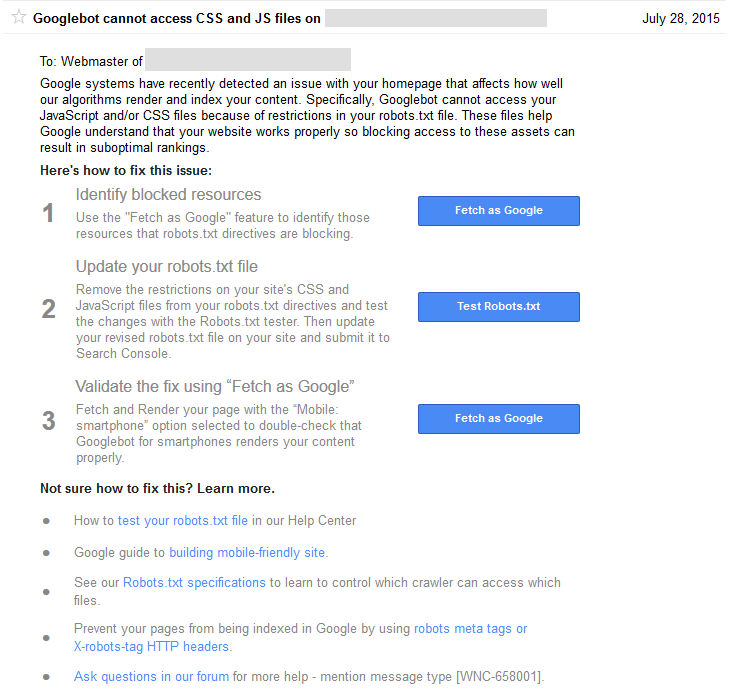
Googlebot cannot access CSS and JS files on _____
Google systems have recently detected an issue with your homepage that affects how well our algorithms render and index your content. Specifically, Googlebot cannot access your JavaScript and/or CSS files because of restrictions in your robots.txt file. These files help Google understand that your website works properly so blocking access to these assets can result in suboptimal rankings.
Here is a copy of the notice in Google Search Console.
 The warning also states emphatically that blocking Javascript and/or CSS “can result in suboptimal rankings.” While Google has been making it known that they must be unblocked as part of the mobile friendly algo, they did also make the changes to the Google technical guidelines advising that it can hurt all rankings last year.
If you need to know which resources are blocked, here is how to find them.
The blocked resources also show up in the “Blocked Resources” section under “Google Index” in Google Search Console. However, Michael Gray tweeted that he was getting the notice for resources that were not blocked.
The message also outlines details of how to fix the issue, likely to help those who have no idea what it means to block those resources and do not realize it is causing an issue.
Google has been increasing the number of messages they send to webmasters, alerting them to site issues that could negatively impact their rankings.
I have asked to see if there is information on how many webmasters received this warning, and will update if more becomes known.
Added: It looks like many are getting warnings from having “Disallow: /wp-content/plugins/” which can be blocked with some WordPress setups. If you use Yoast SEO, you can find the robots.txt in its new location here: SEO / Tools / Files.
Some are getting alerts for 3rd party resources that are blocked, however, Google has previously said 3rd party resources are not an issue since webmasters since they are generally outside of the webmaster’s control.
You can also follow us @Jenstar and @TheSEMPost as we most more updates.
Update 12:30pm PST: Some people weren’t aware there is a much easier way to find blocked resources than the “Fetch as Google” option for every page that Google suggests doing. Do double check, as some people who are reporting false positives actually discover they did have some resources blocked that they weren’t aware of. How to Find Blocked CSS & Javascript in Google Search Console.


Jennifer Slegg
Latest posts by Jennifer Slegg (see all)
- 2022 Update for Google Quality Rater Guidelines – Big YMYL Updates - August 1, 2022
- Google Quality Rater Guidelines: The Low Quality 2021 Update - October 19, 2021
- Rethinking Affiliate Sites With Google’s Product Review Update - April 23, 2021
- New Google Quality Rater Guidelines, Update Adds Emphasis on Needs Met - October 16, 2020
- Google Updates Experiment Statistics for Quality Raters - October 6, 2020
dotcompals says
Yes, i received 4 to 5 such messages during the last 2 hours
Graeme Gibson says
I have received around 20 this morning.
All are from WordPress sites with the following line in their robots.txt “Disallow: /wp-content/plugins/”
While this is the first time I have seen this specific error, I have been flagged by Google in the past for blocking the /wp-content/plugins dir. Though it was always framed as a mobile issue for some reason.
Rishit says
Hi, I also received the same email.
I am not a programmer.
What can I do to adhere to the Google Policies?
I have a WordPress website.
Jennifer Slegg says
Likely you just need to unblock them in your robots.txt. I added a bit to the end of the article about a WordPress issue many are getting alerted with.
Jason says
It seems that most of these emails are “false-positives” — I’m not blocking Google from accessing anything forward-facing (only the Admin Files) and I STILL got 100+ emails and counting.
Here’s my robots.txt that Google is complaining about on 99% of these sites.
User-agent: *
Disallow: /wp-admin/
Cindy says
I have the same – received notices on 2 websites (so far)
User-agent: *
Disaalow: /wp-admin/
No robots.txt files are on the sites.
Jon says
If you have a login button visible on your site then it will take people to within the WP Admin folder. Not an issue but this could be the cause.
Rajesh says
same problem in my website how can i remove
Jeff says
Got the same message for two separate sites. Weird thing is only /wp-admin/ was blocked from both. Google doesn’t need to see what’s in there….
Casey says
Same here Jeff. Best I can tell that’s all we have blocked.
Chris says
Same as Jeff and Casey.
Wonder if this is a bug or a real error?
sam sharples says
I think it must be a bug. I’m getting loads of these alerts and none of my sites are blocking anything other than wp-admin.
I looked in ‘Blocked resources’ and theres nothing listed there. Strange and annoying!
Jon says
See my reply to Cindy above in case it helps.
Leslie says
So now Google want us to make our site less secure?
I am blocking plugins and login and have had a message for every site I run today.
Cyndi Papia says
I received one for my site and several of my clients; one client didn’t even have a robots.txt. So far all notices are saying it can’t access javascript and CSS files. Some wp-admin is blocked, others not.
Chris says
I received one today. All I have disallowed is /wp-admin/
and /wp-includes/. Honestly as a newbie, I don’t even recall adding those. Is that something that Yoast could have done? And is there any harm in removing them?
Andy Kuiper says
this is not nice google – not the correct way of handling this – grrrrrrr.