 In the shopping world, price comparison runs rampant and one of the best features a business can highlight is cost savings. To accomplish this goal, businesses use discounts, sales, specials and promotions. Most e-commerce websites offer coupons or discounts periodically, and these deals are frequently applied to online and in-store shopping.
Today’s lesson in e-commerce PPC is validating the role paid search has in your in-store purchase volume. And those coupons and promotions are exactly how we’re going to do it. When an online coupon is tagged as originating with a paid click, we can track where and when it’s redeemed. Let’s break this down:
The Set Up
- First step is identifying your in-store discount. Let’s say you sell apparel and you’re hoping to increase your “winter gear” sales. Now that we’re moving into the colder months (or the Big Freeze we Mid-westerners are accustomed to), shoppers are looking for new coats, hats, mittens, and snowshoes. For these shoppers, you have a 15% Off sale for all winter clothing merchandise on the floor of your stores.
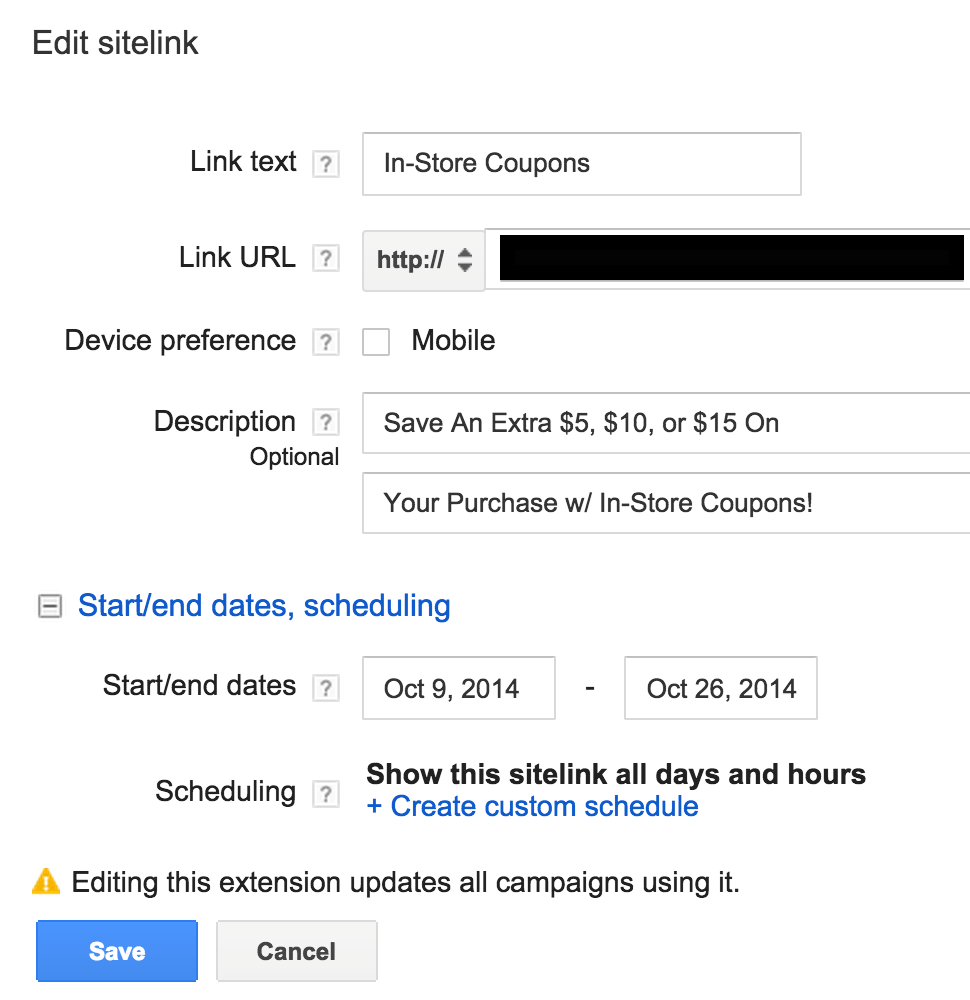
- Next you’ll need to identify where users will find this coupon. Now, we don’t want to send every single online shopper to this page, as some are committed to shopping online and that’s that. Instead of making this coupon page the landing page, we’ll set it as a sitelink so that visitors can elect to click on it, if they’re inclined to use an in-store coupon.
Hot tip #1: For regions with brick & mortar locations, you may want to use geo-targeted bid adjustments, to ensure these shoppers are being exposed to your business.
Hot tip #2: Be sure to include strong and succinct messaging in your sitelink. If you have a different URL for your mobile experience, be sure to create and set your mobile preferred sitelinks as well! https://support.google.com/adwords/answer/2375416
- Once you know what you’re saying and how you’re saying it, let’s make sure we are able to properly follow these shoppers. The easiest way to do this is to create a unique landing page specific to the in-store coupon that is dedicated to paid search. Even better, by creating designated pages for visitors who come to the coupon through organic clicks, emails, and specific shopping site referrals, you’ll have full visibility on what is generating the most sales.
So let’s say your landing page is www.ClothesHorseCo.com. You may want to amend this page with some type of tracking, such as www.ClothesHorseCo.com/PS-WinterSavings (To be cheeky, I was going to link this hypothetical URL to the “let me Google that for you” link: http://lmgtfy.com/?q=ClothingHorseCo.com+isn%27t+a+real+thing# . You don’t have to use the link, it’s just something I’d do for PPC Hero that I figured I’d leave in, just in case you thought it sounded fun)
So you’ve created this sitelink. Maybe you’ve created a few variations of it, based on branded traffic versus non-branded, but either way you’re ready to go live.
Hot Tip #3: You can set specific dates for these coupons to run, which means no worrying about activating and pausing everything yourself!
The Analysis
Once you’ve run a promotion for a bit, you can begin to compare the data. But as we mentioned, the goal of this initiative it to identify which of your online visitors are also in-store purchasers. The analysis will require some back-end data as well and online analysis.
Online Analysis
To obtain a clearer picture of the success of your PPC efforts, you’ll want to pull a very specific report in your Ad Extensions tab.
While in the Ad Extensions tab, select the Segment option “This Extension or Other.”
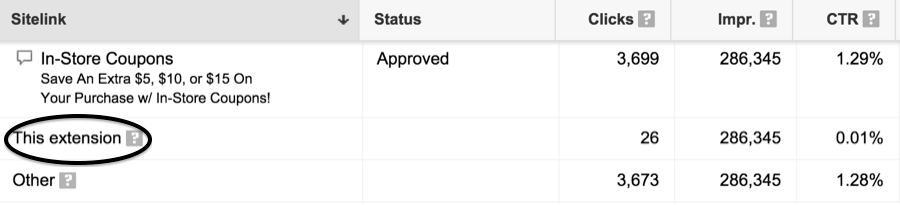
This is one of my favorite reports, as it tells you exactly how this specific extension performs.
Hot tip #4: You should be pulling this report for all of your ad extensions to get the true impact they’re having on your performance.
This report also contains the campaign names, as the coupon is further segmented into Branded and Non-Branded shoppers. What we see here is that the sitelink was present for 286,345 ads over this time frame. But it was only clicked on directly 26 times.
Upon downloading this report, you can segment your data by campaign or even by the URL tagging you use (which will be visible in the downloaded sheet). From this data, you can assess not only the number of times visitors saw and clicked on your ad, but also the cost of this whole effort as well as the number of clicks that still resulted in an online purchase.
A table like the one below can clearly break down exactly what occurred for your In-Store coupon performance:
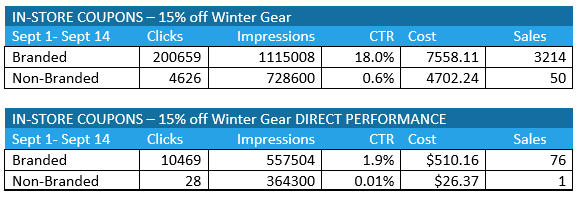
As you can see, it’s the top table that shows the presence of my In-Store coupon in the sitelinks. However, it’s the second table that shows the “This Extension” data specific to my paid search-oriented coupon.
Online Meets In-Store Data
For this portion of the results, you will need to aggregate the number of sales associated with your coupon. This means the individual was exposed to the in-store coupon page, through a PPC sitelink, for example. Those shoppers then either printed off the coupon or simply had it scanned on their phones while making their purchase in the store. The total revenue of the sales associated with these source-specific in-store coupons is then compiled to compare to our AdWords cost.
Although this process may seem a bit tedious, it’s quite easy to implement once you’ve identified the promotion you’d like to target and created the URL for the PPC-specific landing page. Once your coupon has run, you’ll have clear data that shows how frequently your online shoppers take what they’ve found through your PPC ad and turned it into a purchase, and into profit, for your business.


Carrie Albright
Latest posts by Carrie Albright (see all)
- Your Real Ad Extension’s Performance with Segmented Reporting in PPC - May 5, 2015
- 4 Steps to Optimize the Hidden Keywords That Are Killing Your PPC Budget - January 15, 2015
- Tracking Online Coupons & Promotions Through Pay Per Click - December 4, 2014
- Revealing Mobile’s True Impact With Google Analytics - October 2, 2014
[…] Tracking Online Coupons & Promotions Through Pay Per Click, The SEM Post […]